How Annie Baby Monitor Protects Your Baby Monitor Connection
- Created:
6. 10. 2026 - Updated:
5. 10. 2026 -


Who can see your baby’s video? Where does the stream travel? And what happens to your recordings when monitoring ends?
When you turn two phones into a baby monitor, you’re giving an app access to one of the most private spaces in your home. You deserve to know exactly how that connection works.
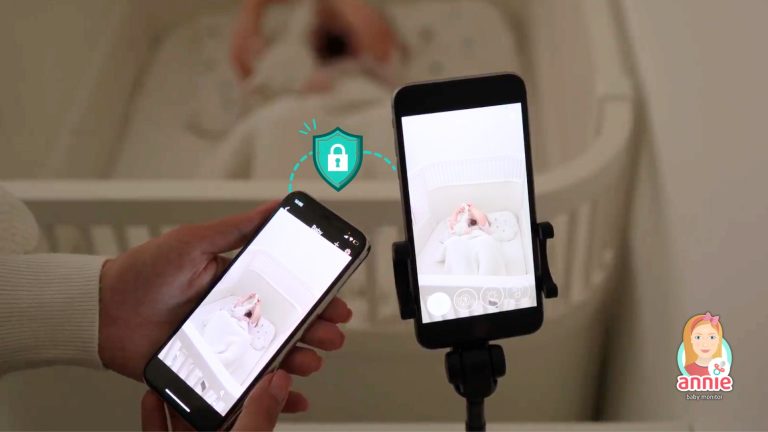
Annie Baby Monitor turns your existing devices into a baby monitoring system. One device stays near your baby, while the other lets you watch and listen over Wi-Fi or mobile data.
But what happens behind the screen?
This page explains how Annie Baby Monitor handles live audio and video, protects your connection, manages account access, stores recordings, and processes personal information.
No complicated security promises. Just clear answers about how your baby monitor app works.
Annie Baby Monitor Security and Privacy at a Glance
Here’s a quick overview of how Annie handles your connection and data.
| Security feature | How Annie Baby Monitor handles it |
|---|---|
| Connection encryption | Audio and video are encrypted during transmission. |
| Communication technology | MQTT over SSL and WebRTC. |
| Direct connection | Peer-to-peer communication is supported. |
| Server relays | TURN servers can relay media when a direct connection is unavailable. |
| Live video storage | Standard monitoring does not maintain a permanent archive of continuous live streams. |
| Saved recordings | Recordings can be saved locally on your device. |
| Motion recordings | Optional features may upload motion-event videos. |
| Account access | Account login and device pairing. |
| Multiple users | Additional family devices can be connected. |
| Account deletion | Available through the app settings. |
| Privacy contact | support@anniebabymonitor.com |
Annie Baby Monitor’s Google Play data safety disclosure confirms that data is encrypted in transit and that users can request data deletion.
How Annie Baby Monitor Transmits Audio and Video
Annie Baby Monitor uses two paired devices to create your baby monitoring system.
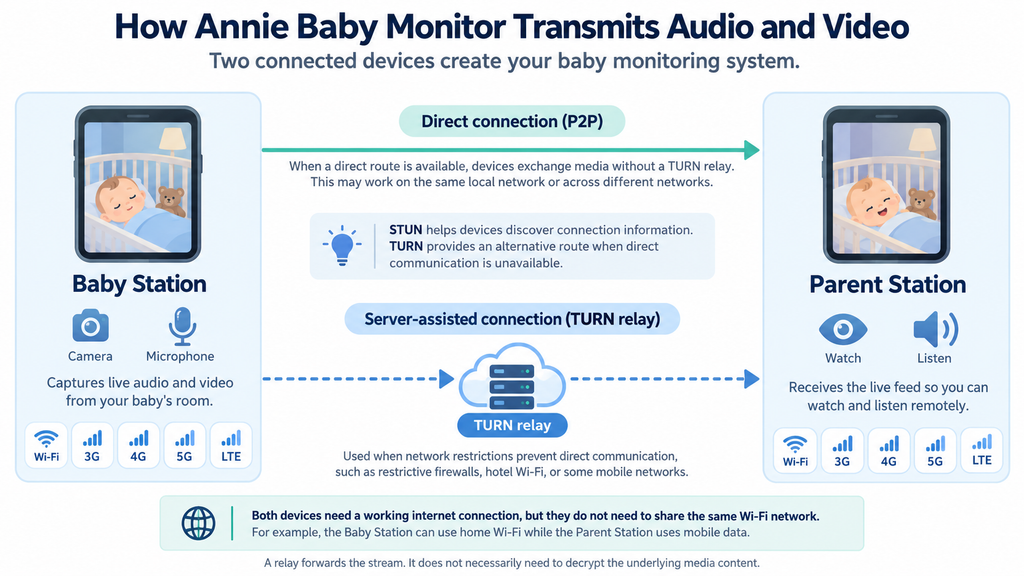
The Baby Station captures audio and video from your baby’s room. The Parent Station receives the live feed, allowing you to watch and listen without entering the room.
Both devices need a working internet connection, but they don’t need to share the same Wi-Fi network.
For example, your Baby Station can remain connected to your home Wi-Fi while your Parent Station uses mobile data.
Annie Baby Monitor supports connections through Wi-Fi, 3G, 4G, 5G, and LTE.
Direct connections and server relays
Annie Baby Monitor’s transmission architecture uses WebRTC and supports both direct peer-to-peer communication and server-assisted connections.
The connection route depends on the network conditions of your two devices.
Direct peer-to-peer connection (P2P)
When the devices can establish a direct route, they exchange media without routing the live stream through a TURN relay.
This may be possible when both devices share a local network or when a direct connection can be established across different networks.
Server-assisted connection (TURN)
Sometimes, network restrictions prevent a direct connection. This can happen on certain mobile networks, hotel Wi-Fi connections, or networks with restrictive firewalls.
In these situations, a TURN server can relay the media between your devices.
STUN helps devices discover connection information, while TURN provides an alternative route when direct communication is unavailable.
A relay forwards the stream. It does not necessarily need to decrypt the underlying media content.
Does Annie Baby Monitor work without internet?
No. Annie Baby Monitor is an internet-connected baby monitor app.
You can use it without Wi-Fi if mobile data is available, but a local Wi-Fi connection without working internet access is not sufficient.
If your home internet stops working, you will need another working connection to continue monitoring.
Is Annie Baby Monitor Encrypted?
Yes. Annie Baby Monitor uses encryption to protect data during transmission.
Encryption makes transmitted information unreadable to someone who intercepts the network traffic without the necessary decryption keys.
This is particularly important when your devices communicate over the internet or use different networks.
What encryption technology does Annie Baby Monitor use?
Annie Baby Monitor’s supplied technical information identifies two communication technologies:
- MQTT over SSL: Used for encrypted application communication.
- WebRTC: Used for real-time communication between devices.
Standard WebRTC media security uses DTLS-SRTP to protect audio and video.
Is Annie Baby Monitor end-to-end encrypted?
Encryption in transit and end-to-end encryption are different concepts.
Encryption in transit protects data as it travels between network endpoints.
End-to-end encryption additionally requires that only the intended endpoints possess the keys necessary to decrypt the protected content.
Annie Baby Monitor’s published security information confirms encryption during transmission and the developers of the Annie Baby Monitor app officially state that the app has end-to-end encryption for video and audio transmission.
Can Annie Baby Monitor servers access the live video?
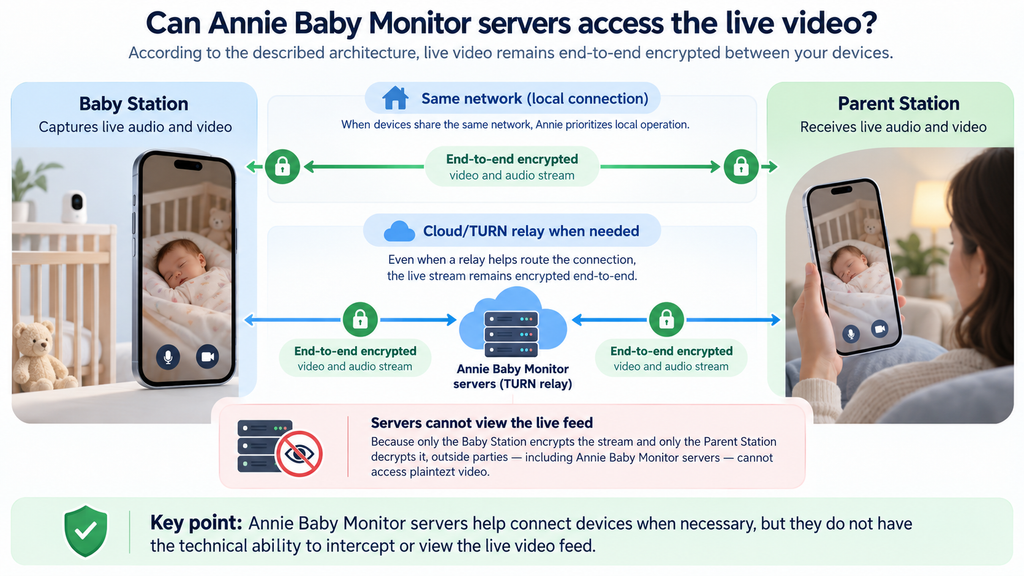
No, Annie Baby Monitor servers cannot access your live video.
According to security reviews and the app’s architecture, the Annie Baby Monitor app uses end-to-end encryption for all video and audio streams transmitted between your devices.
Because the live stream is encrypted directly from the “Baby Station” device and only decrypted once it reaches your “Parent Station” device, no outside parties—including Annie Baby Monitor’s own company and cloud servers—have the technical ability to intercept or view your live feed. Additionally, the app minimizes reliance on cloud servers by prioritizing local network operation whenever your devices are connected to the same network.
Does Annie Baby Monitor Store Your Videos?
The short answer is yes, but only the specific clips that are automatically captured by the activity logs, and they are kept completely private.
Let’s break it down.
Live monitoring and saved recordings are separate functions.
Understanding this distinction helps explain where your baby’s video goes and what happens after a monitoring session.
Live video and audio
Annie Baby Monitor primarily functions as a real-time streaming application.
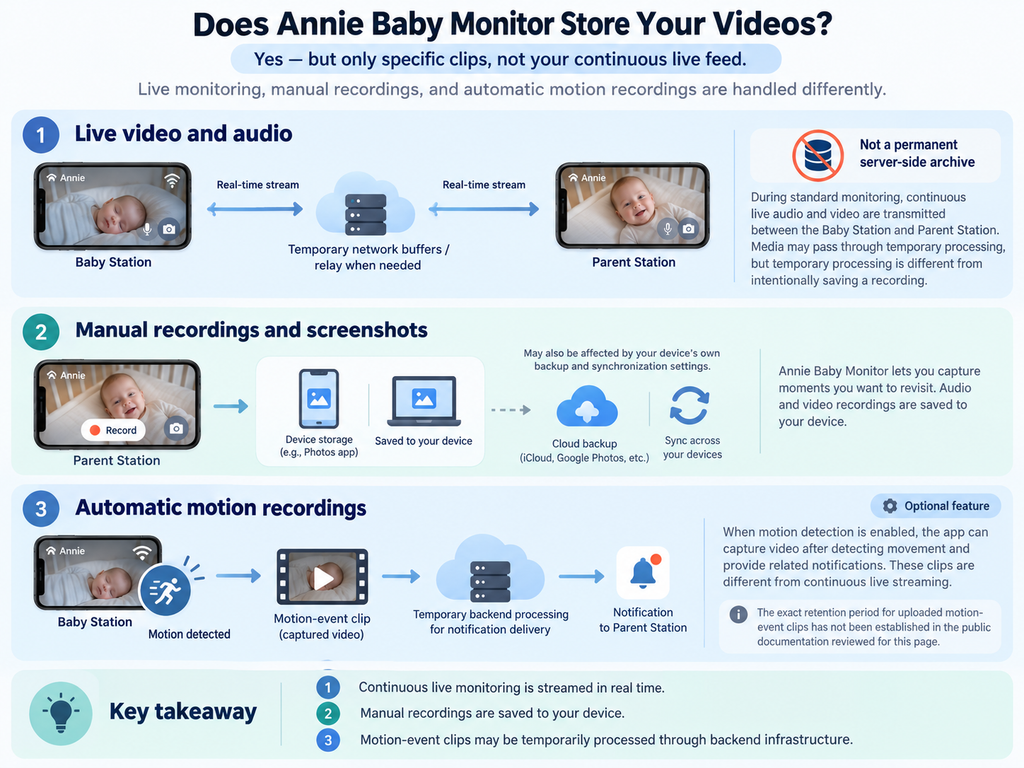
During standard monitoring, continuous live audio and video are transmitted between the Baby Station and Parent Station rather than maintained as a permanent server-side video archive.
Media may pass through temporary network buffers or relay infrastructure when required for transmission.
Temporary processing is different from intentionally saving a recording.
Manual recordings and screenshots
Annie Baby Monitor lets you capture moments you want to revisit.
According to our published documentation, audio and video recordings are saved to your device.
This means that saved recordings can be affected by your device’s own storage, backup, and synchronization settings.
For example, if you use an operating-system photo backup service, content saved to your device may also be synchronized according to that service’s configuration.
What about automatic motion recordings?
Annie Baby Monitor also supports motion detection and automatic recording.
When enabled, the app can capture video after detecting movement and provide related notifications.
Our published feature documentation refers to motion-detection video uploads.
These optional recordings must therefore be distinguished from continuous live streaming.
The supplied technical description indicates that motion-event media may be temporarily processed through backend infrastructure for notification delivery.
The exact retention period for such uploaded clips has not been established in the public documentation reviewed for this page.
How Long Does Annie Baby Monitor Keep Your Data?
Annie Baby Monitor keeps your data only for as long as you maintain an active account, or until you choose to delete it. The developer, Annie Baby Apps s.r.o., follows purpose-limiting data laws (like GDPR), meaning they do not store your data indefinitely “just because”.
The exact timeline depends entirely on the type of data:
- Activity Log Videos and Audio: The app captures short activity snippets (crying, movement, waking up) to populate your baby’s 24-hour sleep log. These remain available on your timeline as long as your profile is active, but you can manually clear this history inside the app at any time.
- Account Info (Email/Subscription Data): Your basic profile data is stored on our secure servers strictly to keep your devices linked and active under your subscription plan.
- Live Video Streams: As established, live feeds are end-to-end encrypted and transient—they are never saved or stored on the company’s servers at all.
How Annie Baby Monitor Protects Your Account
Annie Baby Monitor protects your account through a combination of unique pairing codes, end-to-end encryption, and strict mobile privacy standards. Because the app turns your everyday devices (like smartphones, tablets, or laptops) into a baby monitor system, it relies on secure device linking rather than traditional, easily hackable passwords.
Account login and password security
Annie Baby Monitor supports account registration using login credentials, with additional sign-in options available through supported platforms.
When creating or maintaining your account, we recommend using a strong, unique password that you do not reuse elsewhere.
The exact enforced password complexity requirements and credential-storage implementation are not specified in Annie Baby Monitor’s current public security documentation.
Likewise, the availability of additional authentication controls may depend on the sign-in method used.
If you use an external identity provider, enable the security protections offered by that provider wherever available.
How device pairing works
To connect two devices, Annie Baby Monitor app provides a pairing process using a one-time unique generated code.
You can also connect another device by signing in to your existing account.
The process is straightforward:
- Open Annie Baby Monitor app on both devices.
- Generate a pairing code on the first device.
- Enter the code on the second device.
- Complete the pairing process.
- Start monitoring.
You can find additional setup information in our in-depth article “Turn Your Phone Into a Baby Monitor: Simple Step-By-Step Guide” and in Annie Baby Monitor FAQ.
Can multiple people access the baby monitor?
Yes.
Annie Baby Monitor supports multiple Parent Stations and Baby Stations within a family account.
This allows parents and other trusted caregivers to connect compatible devices without purchasing a separate subscription for each one.
However, sharing access also means deciding carefully who should be able to connect.
There’s no need to share login credentials or pairing information—simply invite another user to your account on your device, where you can also revoke their access.
How do I remove access from another device?
To remove access or disconnect another device from your Annie Baby Monitor system, you have two primary methods depending on whether you want to end a quick session or completely revoke a device’s paired connection.
Method 1: Disconnect a Session (Quick Removal)
If someone else (like a grandparent or babysitter) is currently connected as a “Parent Station” and viewing the feed, you can disconnect them directly from the device acting as the Baby Station:
- Tap the Settings/Menu icon (three horizontal bars or lines) on the Baby Station device screen.
- Look for the list of actively connected Parent Stations / Members.
- Tap the Trash Can icon or swipe left on the device name you want to disconnect, and select Remove / Delete.
Method 2: Force Log Out / Complete Access Revocation
Because Annie Baby Monitor links devices either by a unique pairing code or through a shared account login, the most foolproof way to completely revoke long-term access from an external phone or tablet is to log out of your main account or change the account details:
- Open the app and navigate to Settings -> Account & Subscription.
- Choose to Log Out of the account on your devices.
- If you previously shared your primary login details with the other person, reset your password through the login interface. Once the password is changed, any other device utilizing your shared subscription credentials will be forced to re-authenticate and will lose active access.
What Personal Information Does Annie Collect?
To provide and maintain the service, Annie Baby Monitor processes certain account, device, and technical information.
Depending on how you use the app, this may include:
- Account details, such as your email address and user ID.
- Device information and identifiers.
- Operating system and application information.
- IP addresses and connection-related information.
- Usage data and diagnostic logs.
- Crash and performance information.
- Purchase and subscription-related information.
Some information is provided directly during registration, while other information may be collected automatically when using the service.
Our GDPR documentation explains the relevant data categories and processing purposes.
Why does Annie Baby Monitor need camera and microphone permissions?
Annie Baby Monitor needs access to the camera and microphone to turn your device into a Baby Station.
Depending on the features used, the app may also request permissions related to storage, photos, or other device functions.
You can manage application permissions through your device settings.
Keep in mind that removing essential permissions, such as camera or microphone access, may prevent monitoring from working correctly.
Does Annie Baby Monitor Share Data With Third-Party Services?
Like many mobile applications, Annie Baby Monitor uses external service providers for certain operational and analytical functions.
These services may process information necessary to provide, maintain, troubleshoot, or improve the app. Annie Baby Monitor shares certain types of non-personal data with third-party services, but it strictly does not share or sell your private video or audio recordings.
Our published privacy policy identifies the following services.
Firebase
Firebase is identified as an analytics service used to help understand and improve the application.
Depending on the service and configuration, analytical information may include app usage and device-related data.
Meta SDK
Annie Baby Monitor uses the Meta SDK within its mobile applications to track specified app events, including installation, activation, subscriptions, and trial activation.
These events support marketing measurement and campaign optimization.
The Meta Pixel and Conversions API used on the Annie Baby Monitor website are documented separately from the mobile SDK.
Subscription and payment providers
Payments and subscriptions may be handled through providers such as Apple, Google, or PayPal, depending on the purchase method. Apple, Google or PayPal support charge you directly and we do not have any access to their systems. We can just see sale’s volume anonymously.
These providers operate their own systems and privacy policies.
Hosting and media infrastructure
Annie Baby Monitor also depends on technical infrastructure for account services, connectivity, and supported media transmission.
Our GDPR documentation states that an updated list of relevant data processors may be requested from the company.
For additional details about the providers involved in processing your information, contact support.
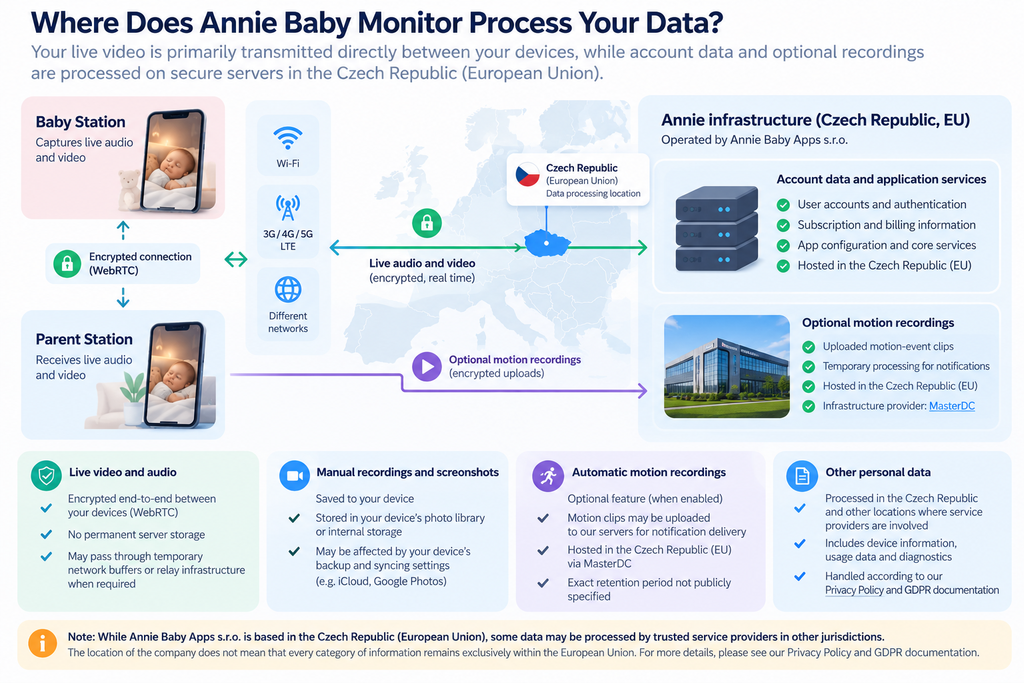
Where Does Annie Baby Monitor Process Your Data?
Annie Baby Apps s.r.o. is established in Brno, Czech Republic.
Our published privacy policy identifies processing in the Czech Republic and explains that personal data may also be transferred to other jurisdictions where service providers are involved.
Our GDPR documentation further states that processing may take place at the company’s operating offices and other locations where relevant processing parties are based.
This means the location of the company should not be confused with a guarantee that every category of information remains exclusively within the European Union.
The exact hosting regions used for account databases is in Czech Republic (European Union). Annie Baby Monitor relies heavily on a peer-to-peer (P2P) network, and optional uploaded recordings are hosting in region Czech Republic (European Union), where infrastructure provider is MasterDC.
How to Delete Your Annie Baby Monitor Account and Personal Data
You can delete your account directly in the app.
Step by step guide on how to delete your Annie Baby Monitor account:
Follow these steps:
- Open Annie Baby Monitor.
- Go to Settings.
- Select Account.
- Scroll down.
- Tap Delete the account.
‼️ Account deletion is separate from subscription cancellation.
If you have an active recurring subscription, cancel it through the relevant payment provider to prevent future renewal charges.
What happens to your information after deletion?
When you trigger the official account deletion process within the Annie Baby Monitor app, your data undergoes an irreversible server-side purge. Because the developer (Annie Baby Apps s.r.o.) is based in the European Union, this deletion process is governed by strict GDPR data-erasure compliance.
Locally saved recordings are not affected by deleting your account and will remain on your device’s physical storage.
Because the Annie Baby Monitor servers have no control over your phone or tablet’s internal file system, they cannot reach into your device to erase locally stored media.
Requesting access to or deletion of your personal data
You may also contact us directly to exercise applicable privacy rights.
Our GDPR documentation describes rights relating to personal data, including access, correction, deletion, and restriction of processing under relevant circumstances.
It also states that requests are addressed as early as possible and within one month.
To submit a request, contact support.
How to Keep Your Baby Monitor Connection More Secure
Annie Baby Monitor’s security features are one part of protecting your monitoring setup. Your devices and accounts matter too.
A few practical habits can help:
- Use a strong, unique password for your account.
- Secure your home Wi-Fi with WPA2 or WPA3.
- Keep Annie Baby Monitor and your device operating systems updated.
- Avoid sharing pairing codes or login credentials unnecessarily.
- Lock your devices when they are not in use.
- Review connected devices and account access when your caregiving arrangements change.
- Contact support if you notice unexpected account activity.
When using shared or public Wi-Fi, make sure the network is trustworthy and test your connection before relying on it for monitoring.
For more information, read our guide on whether Wi-Fi baby monitors can be hacked.
How to Report a Security or Privacy Concern
If you suspect unauthorized access, discover a potential vulnerability, or have concerns about how your information is processed, please contact us.
Security and privacy contact: support@anniebabymonitor.com or use our web form.
When reporting an issue, include the affected device or platform, a description of the problem, and any relevant error messages.
Please do not send your account password.
Our support team can receive your report and help direct your inquiry to the appropriate team.
Frequently Asked Questions About Annie Baby Monitor Security
Annie Baby Monitor uses encrypted transmission, account login, and device pairing to protect monitoring connections. No internet-connected system can guarantee absolute security, so maintaining secure devices, networks, and account credentials remains important.
Yes. Annie Baby Monitor’s published information confirms encryption in transit. The supplied technical information identifies MQTT over SSL and WebRTC as communication technologies.
Yes, the Annie Baby Monitor app utilizes end-to-end encryption (E2EE) to secure all live audio and video feeds transmitted between your devices.
No, Annie Baby Monitor servers do not continuously record or store your live video feed. However, they do temporarily store short video clips and audio snapshots if you have specific alert features enabled.
Yes. Both devices need an internet connection, but they do not need to use the same Wi-Fi network.
Yes. Annie Baby Monitor supports multiple connected devices within a family account through pairing or account login. Only share access with people you trust.
Yes. Open Settings, select Account, and choose Delete the account.
Remember that deleting your account does not automatically cancel your subscription.
Email support@anniebabymonitor.com for assistance with account security, personal data, or potential security vulnerabilities.
Annie Baby Monitor Security and Privacy Resources
Your family’s privacy matters. We want you to understand how the app works, what information it processes, and how to contact us whenever you have a question.
For more detailed information, please visit our official documentation:
Privacy Policy — Learn how Annie Baby Monitor collects, uses, processes, and protects personal information.
GDPR Documentation — Review data processing, retention criteria, and your privacy rights.
Frequently Asked Questions — Find help with pairing, account management, and subscription settings.
Last content update: October 5, 2026


